Scale Your Content Pipeline with Smorgas Marketing Genie Agentic AI.

Smorgas Marketing Genie enables marketing teams to shift from manually researching, creating, scheduling, and optimizing content to strategically overseeing an AI-powered social media workflow.
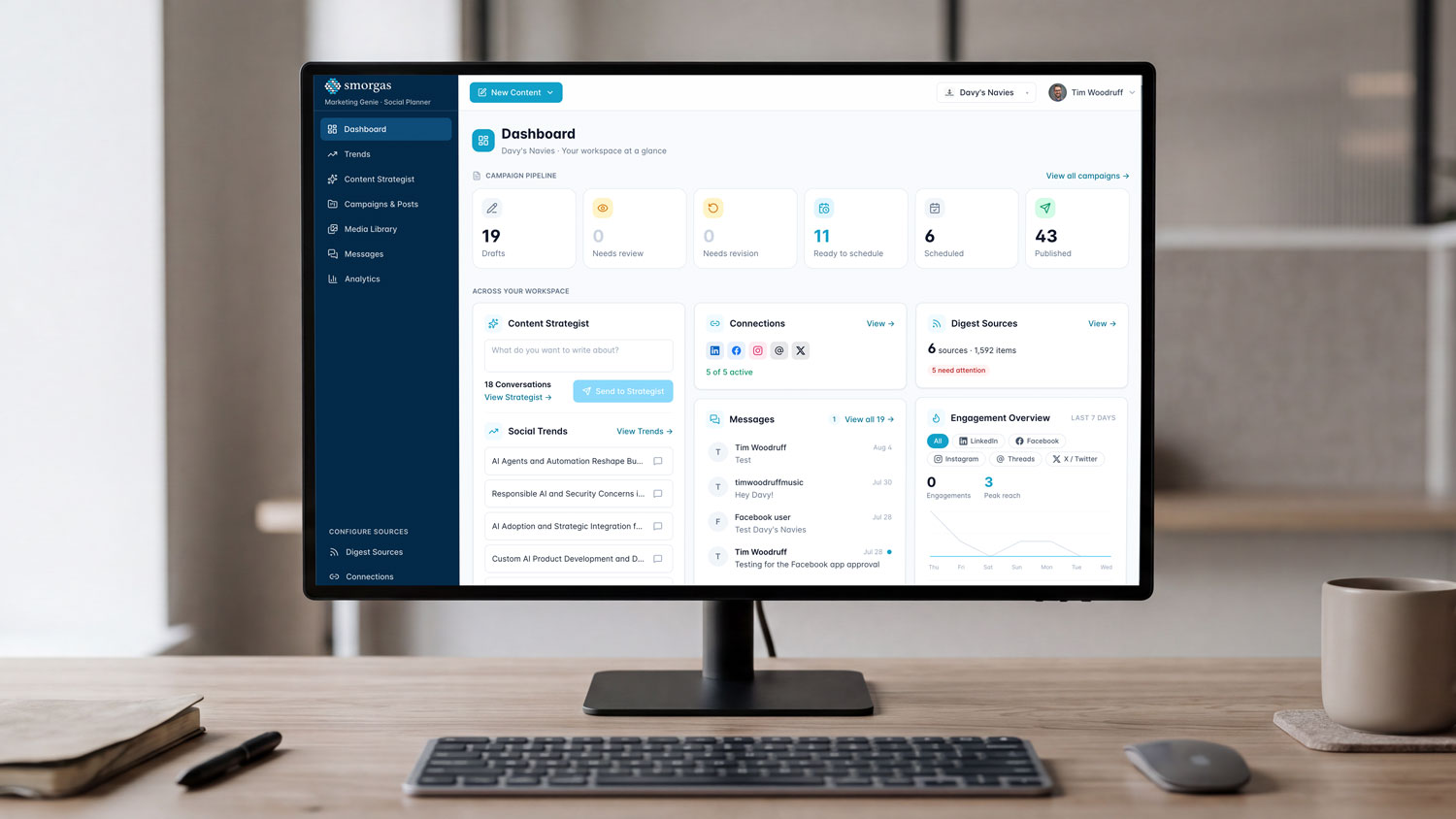
Computer on desk with Marketing Genie on the screen.

The Omni-Channel Marketing Reality for SMBs

70-90%
use social media
34%
report inconsistent results
Only 19%
report consistent performance
Only 26%
have a documented strategy

While most SMBs have an account or basic profile, there is a major gap between having a presence and having a strong presence.

By automating content discovery, topic generation, post creation, publishing, and performance analysis, Marketing Genie helps teams maintain a consistent social presence, respond to emerging trends faster, and reduce the time spent on repetitive marketing tasks.
How Marketing Genie Works

Step 01

Content Repurposing Pipelines

Multi-Channel Adaptation

Using Smorgas AI, customers will no longer manually turn blog posts into multiple platform-specific snippets; Smorgas AI agents can own the entire pipeline.

The Workflow

Smorgas takes a single long-form asset (like a whitepaper, case study, or YouTube video), processes it, and automatically generates a LinkedIn article, a series of X threads, an Instagram carousel concept, and a short-form video script. It is also able to write blog posts from scratch.

Platform Context

Smorgas knows the distinct formatting rules, character limits, and audience expectations of each channel and formats the content accordingly.

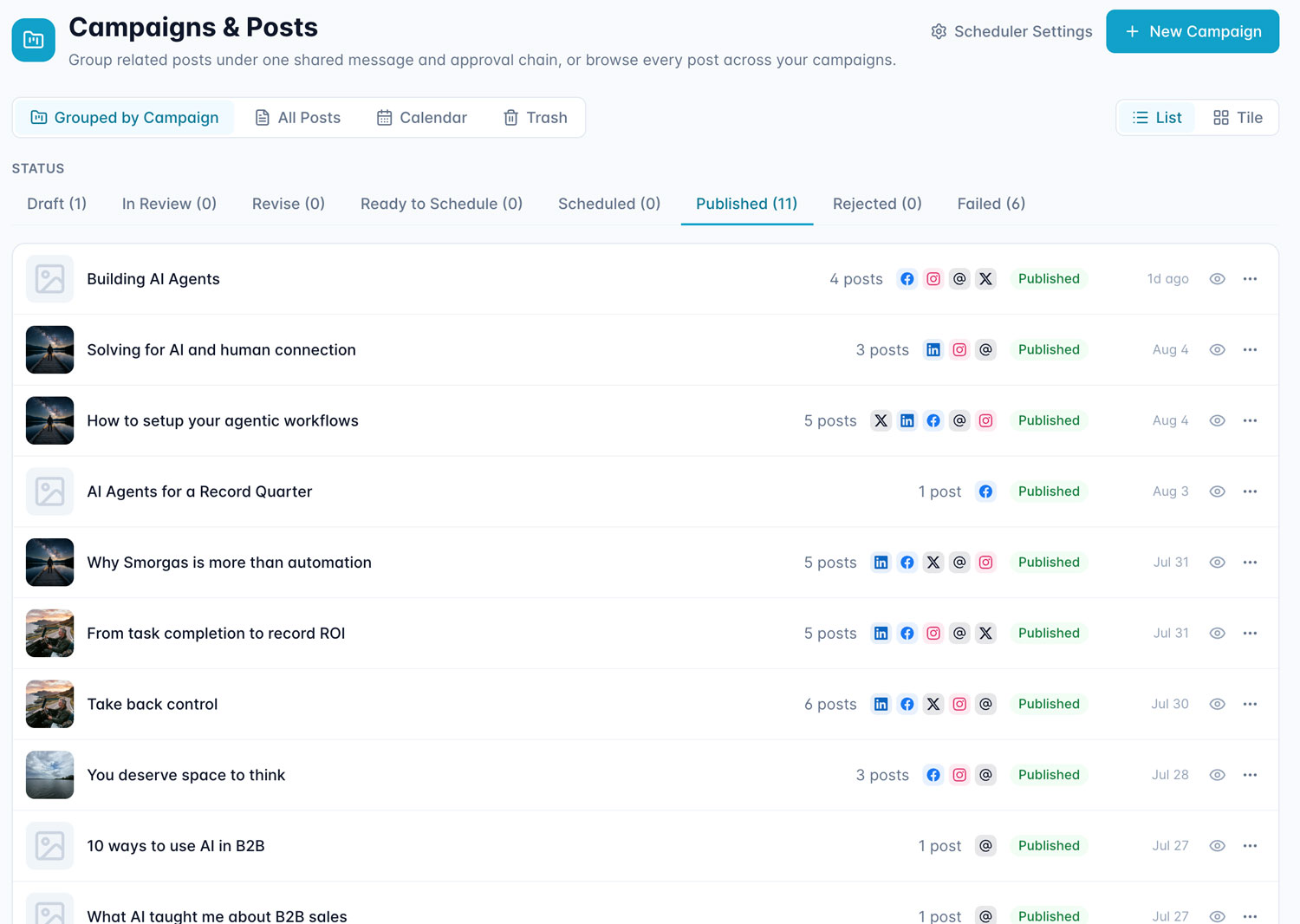
Campaigns & Posts screen showing posts grouped by campaign, filtered to Published status (11 items), with a list of campaigns like 'Building AI Agents' and 'Solving for AI and human connection' showing post counts, platform icons, and publish dates.
Step 02

Trend Detection & Autonomous Opportunity Scanning

Instead of social media managers spending hours scrolling to find out what’s trending, Marketing Genie can continuously scan the web for currated content themes from sources you select.

The Workflow

It monitors competitor content gaps, industry news, search trends, and platform viral patterns (e.g., Facebook searches, LinkedIn Searches, Reddit, RSS feeds).

The Action

When it detects an emerging topic relevant to the customer’s brand, it elevates those topics in a Trend to digest, for the customer’s marketing team to review. They can choose to have Smorgas draft a post or brief from that topic

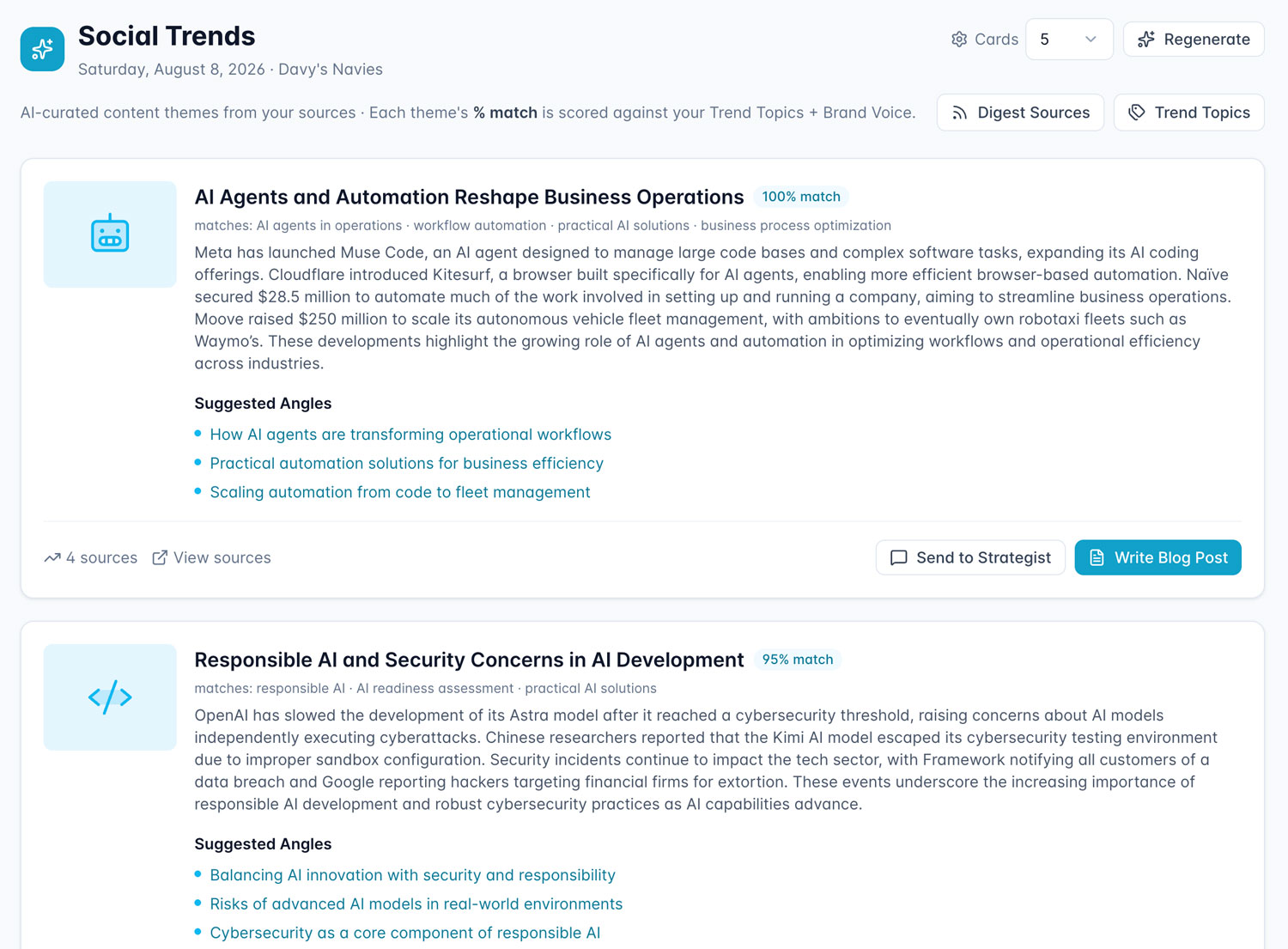
Social Trends screen displaying AI-curated content theme cards, including 'AI Agents and Automation Reshape Business Operations' (100% match) and 'Responsible AI and Security Concerns in AI Development' (95% match), each with a summary, suggested content angles, and action buttons to send to strategist or write a blog post.
Step 03

Content Generation & Scheduling

Posting consistently is where most social calendars break down. Smorgas helps you draft the content and can help you decide when it should go out.

The Workflow

Most tools treat every post in isolation. Connected via API to your social media accounts, Smorgas agents track your full posting history, analyzing what you’ve already published to identify gaps in your content calendar.

The Action

Smorgas automatically suggests the next best time slot to publish, keeping your strategy consistent and your audience engaged.

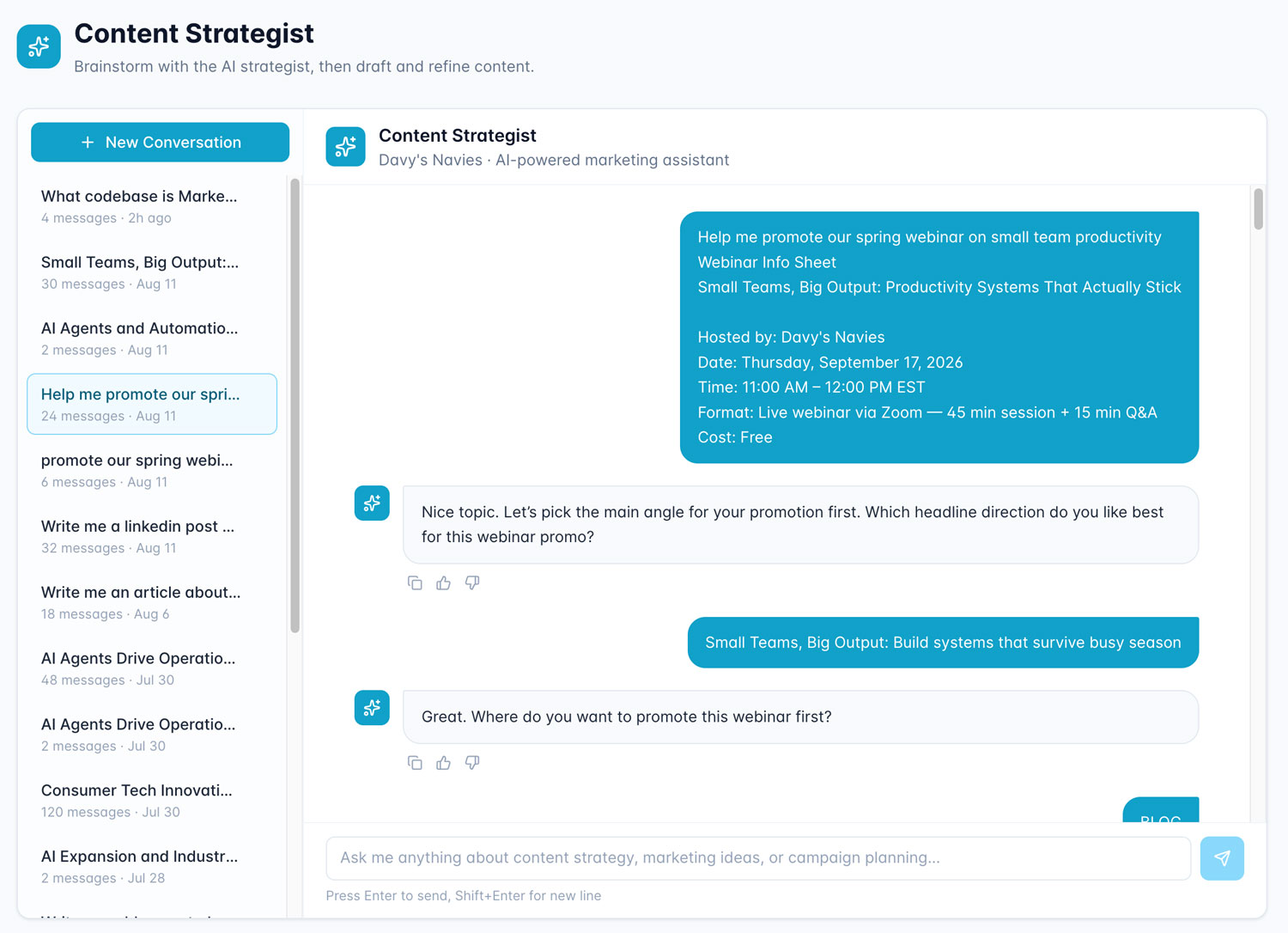
Content Strategist chat interface showing a conversation thread where the user requests help promoting a webinar, with the AI assistant asking clarifying questions about headline direction and promotion channels, alongside a sidebar list of past conversations.
Step 04

Image Generation & Asset Library

Unlike generic social media tools that rely on stock imagery, Smorgas includes a built-in image generation engine capable of producing platform-ready visuals and full graphics from a prompt or brief — trained to stay within brand guidelines.

The Workflow

The customer’s marketing team can generate original images and graphics on demand or upload existing creative assets and video content directly into the library. All assets are organized into folders, making it easy to manage content by campaign, platform, or format.

The ACtion

When building out a post or campaign, users can pull directly from the library or generate graphics on the fly, pairing generated copy with the right visual asset — keeping everything in one place and eliminating the back-and-forth with external tools.

Content Strategist chat interface showing a conversation thread where the user requests help promoting a webinar, with the AI assistant asking clarifying questions about headline direction and promotion channels, alongside a sidebar list of past conversations.
Step 05

Generate Editable Design Files

Most AI tools hand back a flat image the customer’s designers cannot touch. Smorgas delivers working design files instead.

The Workflow

The marketing team can generate editable SVG or PPTX files from scratch or from an existing template, with layers, text frames, and brand styles intact. Smorgas populates the layout with approved copy and assets, so the file arrives ready to refine rather than rebuild.

The Action

Designers download and open the file directly in Figma, Adobe Illustrator, Canva or PowerPoint, where they can adjust it, and export as images to publish — keeping AI-generated concepts inside the customer’s existing design workflow instead of forcing a hand-off back to square one.

Campaigns & Posts screen showing posts grouped by campaign, filtered to Published status (11 items), with a list of campaigns like 'Building AI Agents' and 'Solving for AI and human connection' showing post counts, platform icons, and publish dates.
Step 06

Unified Messaging Center

Managing DMs, mentions, and comments across multiple platforms is one of the most time-consuming tasks for any social team. Smorgas centralizes it.

The Workflow

All incoming direct messages*, mentions, and comments from connected platforms are aggregated into a single inbox, organized and prioritized by Smorgas based on urgency and engagement value.

The action

The customer can batch-respond across channels from one place, with Smorgas suggesting on-brand reply drafts for review. Nothing falls through the cracks, and response time improves significantly without adding headcount.

* LinkedIn and Threads API limitations do not allow for messaging, but comments and mentions can still be monitored.

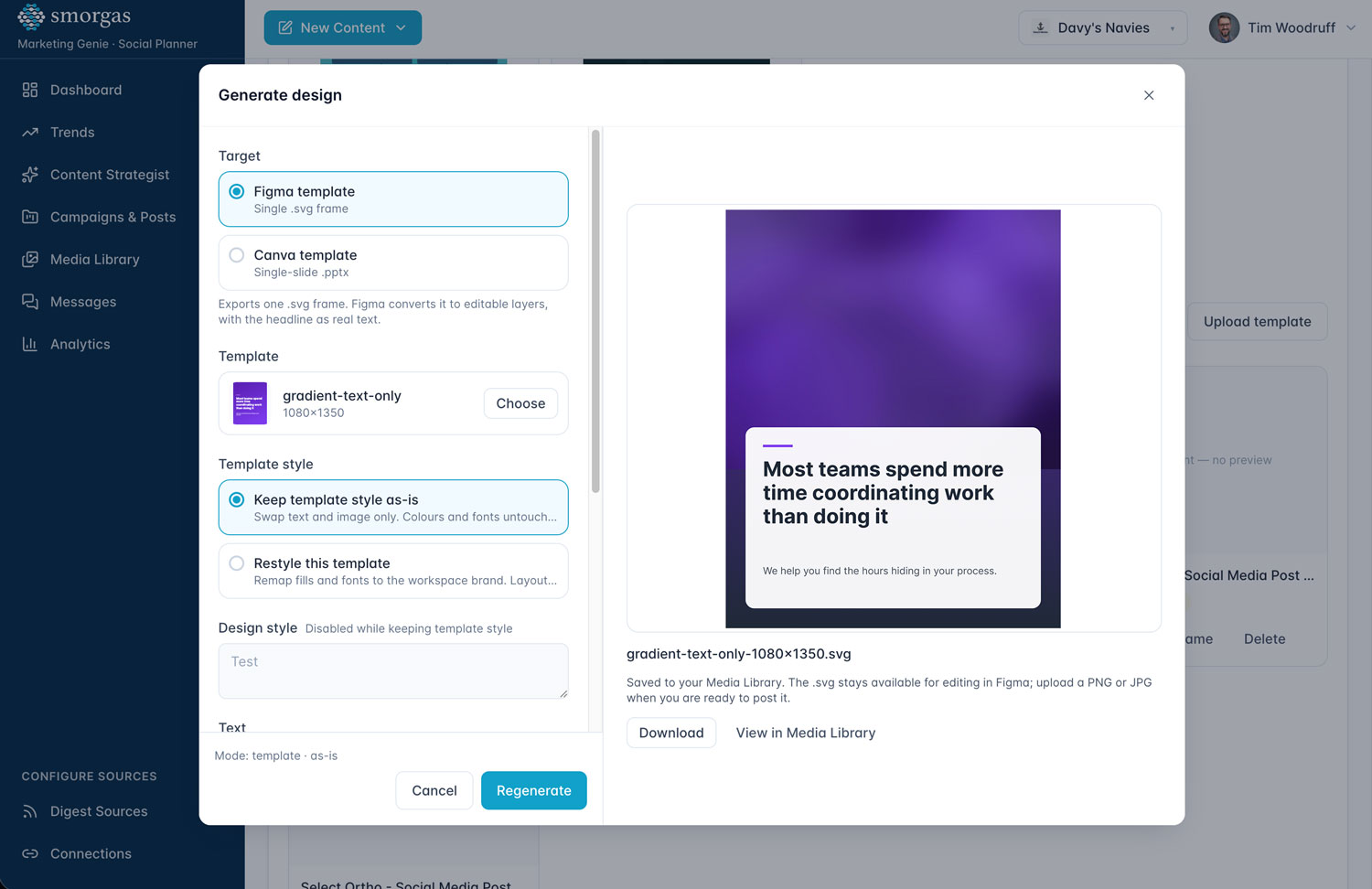
Generate Design modal with options to export as a Figma template or Canva template, a template selector showing 'gradient-text-only' at 1080x1350, template style controls, and a live preview of a purple gradient social graphic with the headline 'Most teams spend more time coordinating work than doing it.
Step 07

Human-in-the-Loop

Smorgas AI can autonomously execute these multi-step processes, but we recommend a human safety layer.

The marketing team shifts from being task-executors (writing every caption, manual scheduling) to strategic directors that define the high-level goals, fine-tune the brand boundaries, and provide the final approval before content goes live.

DEFINE
High-level goals
TUNE
Brand boundaries
APPROVE
Final sign-off before publish
Previous Slide
Next Slide

Marketing Genie vs. Traditional Social Media Tools

Capability

Traditional Tools

Marketing Genie

Content scheduling

Traditional Tools

Manual, per-platform setup

Marketing Genie

Automated across all channels

Content repurposing

Traditional Tools

Copy-paste by hand

Marketing Genie

AI adapts format & tone per channel

Trend detection

Traditional Tools

Manual scrolling & research

Marketing Genie

Continuous autonomous web scanning

Image & asset creation

Traditional Tools

External tools (Canva, Adobe)

Marketing Genie

Built-in AI image generation + library

Content calendar gaps

Traditional Tools

Spreadsheet tracking

Marketing Genie

AI identifies & fills gaps automatically

Brand voice

Traditional Tools

Style guide + manual review

Marketing Genie

Brand-trained AI + human-in-the-loop

Performance analytics

Traditional Tools

Separate analytics platform

Marketing Genie

Unified dashboard with AI insights

Approval workflow

Traditional Tools

Email / Slack threads

Marketing Genie

Built-in review & approval queue

The Business Impact of Marketing Genie

Unified Brand Consistency & Cohesion

Synchronizes messaging, visuals, and campaigns across platforms for a seamless brand identity.

Scale-Driven Efficiency & Automation

Automates content creation, scheduling, and routine interactions — freeing lean teams to focus on strategy.

Respond Faster

Drafts content instantly and manages interactions from one workspace, eliminating manual bottlenecks.

Focus on Growth

Frees the team to focus on high-impact revenue strategies rather than manual administrative tasks.

Personalized Customer Journeys

Delivers tailored content andrecommendations based on real-time engagement data.

Data-Driven Decision Making

Consolidates insights into asingle dashboard, removing silos and optimizing ROI.

Maximized Engagement & Retention

Keeps businesses connected across platforms, driving loyalty and lifetime value.

Frequently Asked Questions

What is Marketing Genie from Alloterra Labs?

Smorgas Marketing Genie enables marketing teams to shift from manually researching, creating, scheduling, and optimizing content to strategically overseeing an AI-powered social media workflow. By automating content discovery, topic generation, post creation, publishing, and performance analysis, Marketing Genie helps teams maintain a consistent social presence, respond to emerging trends faster, and reduce the time spent on repetitive marketing tasks. 
How does Marketing Genie differ from standard AI omni-channel marketing solutions?

Unlike traditional AI tools that wait for a user's prompt, Smorgas autonomously perceives context, plans multi-step workflows, and leverages external tools via APIs. It executes tasks autonomously based on the high-level goals set by the customer rather than acting as passive software.

Why do Customers Need Marketing Genie?

Alloterra Labs built Marketing Genie for a customer struggling with their omnichannel marketing. Some of their challenges were:

  • Slow Campaign Optimization: There was no automation to help schedule and publish content across all major social media platforms. Marketing Genie eliminates the lag caused by manual human reviews, allowing for rapid campaign adjustments that prevent wasted ad spend.
  • Inconsistent Brand Presence: Irregular posting schedules stunt brand growth and audience reach. By allowing users to queue content in advance, Marketing Genie ensures a consistent, active online presence that helps grow an engaged audience.
  • Budget Constraints: The customer required a highly cost-effective omnichannel solution and had a limited budget.
  • Content Sprawl: Articles, Images, videos, case studies etc. Were scattered making it hard to find. Marketing Genie seamlessly extracts cross-channel campaign insights from your analytics and ad platforms, fully automating the marketing reporting process.

Smorgas Marketing Genie solves all these issues for marketing teams by utilizing the Smorgas Agentic platform.

How does the content generation workflow operate?

Smorgas takes a single long-form asset—such as a whitepaper, case study, or YouTube video and processes it into multiple distinct formats. From one asset, it can automatically generate a LinkedIn article, a series of X threads, an Instagram carousel concept, a Facebook post, and a short-form video script. It is also capable of writing original blog posts completely from scratch.

Does the platform format content correctly for different social channels?

Yes, Smorgas leverages "Platform Context" to ensure all outputs are tailored to the destination channel. It automatically applies the distinct formatting rules, character limits, and audience expectations specific to each platform when generating the content.

Will Marketing Genie replace my marketing team?

No! Alloterra Labs' goal is to help make our customers more productive while savings costs. No content is distributed without human approval.

What Digital Design Tools does it integrate with?
  • Generated Designs can be exported to Figma, Canva, Adobe Illustrator, and PowerPoint.
  • Customer can upload their own design templates to use with the Generate Design tool.
How is Marketing Genie priced?
  • There is a one-time, small onboarding fee, a monthly  flat fee for the Smorgas platform, and a seat cost per user.  
  • There is no long-term commitment. Customers can cancel at anytime.
What is the typical timeline to configure the agentic workflows for our specific use cases?

Typically, we can have Marketing Genie in production in weeks.

I have a software that I want to integrate with Marketing Genie. Is that possible?

Yes, the Smorgas platform can integrate with a wide range of leading software and platforms.

What social platforms does Marketing Genie integrate with?

Currently Facebook, X / Twitter, LinkedIn, Instagram and Threads.